winIDEA: Frequently asked questions regarding C++
winIDEA supports debugging C++ source code. This article answers frequently asked questions regarding C++.
Is name mangling supported?
Yes, winIDEA supports name mangling of C++ symbols.
Name mangling is a technique used by C++ compilers to resolve function overloading. It gives a unique, encoded name to each function in the compiler output so the linker can correctly link all function calls with their definitions.
winIDEA can demangle these names so that when debugging a C++ application, the original function names, function arguments, and types are displayed instead of the encoded mangled names. This allows intuitive debugging on the C++ source code level.
C++ function symbols are missing in the Symbol Browser
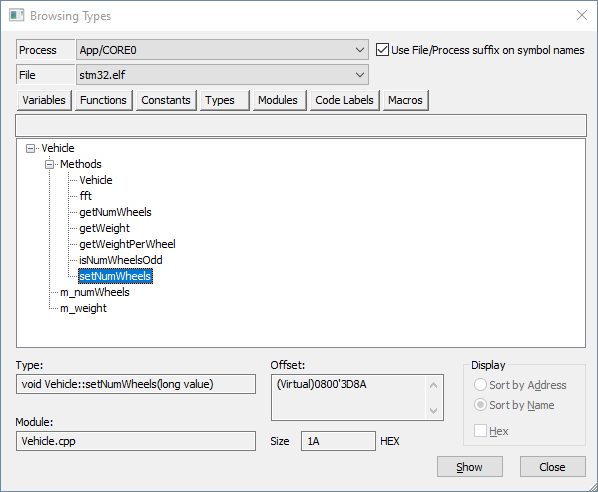
winIDEA Symbol Browser displays C++ function (method) symbols in the Functions tab if the option Display is set to Sort by address.
To locate the method by name:
1. Use Types.
2. Locate the C++ class first.
3. Expand it. This will show only the methods of this class.
More resources in winIDEA Help
Similar topics
- Migrating winIDEA workspace from 9.17 and older to 9.21 and above - transition guide
- Arm Cortex: Mismatch between Editor and Watch Window for double-float variables
- daqIDEA: Using multiple Symbol Files
- Watch Window: Create a Python initialization script
- winIDEA AUTOSAR: Tracing and profiling category 1 ISRs