Infineon AURIX TC4x: Program devices in Foreground Boot mode
TC4x devices support two boot modes:
- Background Boot (default) - CPU0 and CPUcs start simultaneously. If Halt-after-reset is requested, both cores stop at the first instruction of the user code.
- Foreground Boot - Foreground Boot is enabled via the SSWWAIT_ bitfields in the User Configuration Blocks (UCBs). The user application of the CPUcs is expected to signalize the CPU0 to finalize the boot process. If the Halt-after-reset is requested, CPUcs stops at the first instruction of application code (same as Background), but CPU0 will still be in a tight loop in the SSW, waiting for the CSRM2HT.RL bit to be set.
Below you can see the CPU Statuses in the Session Explorer window directly after reset in Foreground mode (CPU0 would be suspended with core synchronization enabled).
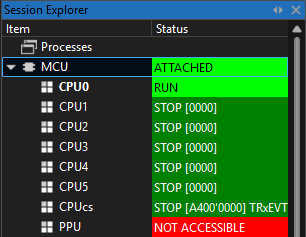
The difference between Background and Foreground Boot mode is important when programming or debugging.
Debugging
If you issue a reset, you can debug the code as it is from the start, including the release of CPU0 by the CPUcs.
Programming
Programming Non-Volatile Memory (NVM) requires both cores to transition through the boot sequence correctly. Standard programming is not possible without help. winIDEA uses a Handshake script to ease the workflow.
How to configure winIDEA
The Handshake script emulates the handshake normally performed by CPUcs, allowing CPU0 to complete the boot process so programming can proceed.
1. Open CPU Options | Reset| Before Programming
2. In section Initialization before Programming | Initialize, add a custom script Fake finished foreground boot.
3. Enable Reset CPU after Download.
4. Perform Download.
More resources
- Add a custom initialization script - winIDEA Help