winIDEA: Unlock GD32A7 devices with static password or Challenge-Response
The GD32A7 device family includes an Arm Cortex-M23 core that can be configured as a Hardware Security Module (HSM).
When the device operates in HSM mode, both the HSM core and the ARM Cortex-M7 cores can be secured using either:
- a static password, or
- a challenge–response mechanism.
To handle the unlocking of secured cores, winIDEA provides the EVE script, which automates the unlock process during connection.
Requirements
- winIDEA 9.21.378 or newer
-
Passwords for:
- HSM (Cortex-M23) core
- Arm Cortex-M7 core(s)
Configuration steps
Add the EVE script
1. In winIDEA, navigate to Hardware | CPU Options | Reset.
2. Under Connect script, select Custom for programming, debugging, attaching (or any combination you require).
3. Select the EVE script GD32A7xx: Unlock Debug Interface using Password or Challenge Response.
Enter the password(s)
1. Open the Parameters for GD32A7xx_ConnectToSecuredSoC.cpp and select whether to unlock:
- Arm Cortex-M7 (host) core with static password or Challenge–Response
HSM (Cortex-M23) core with Challenge–Response
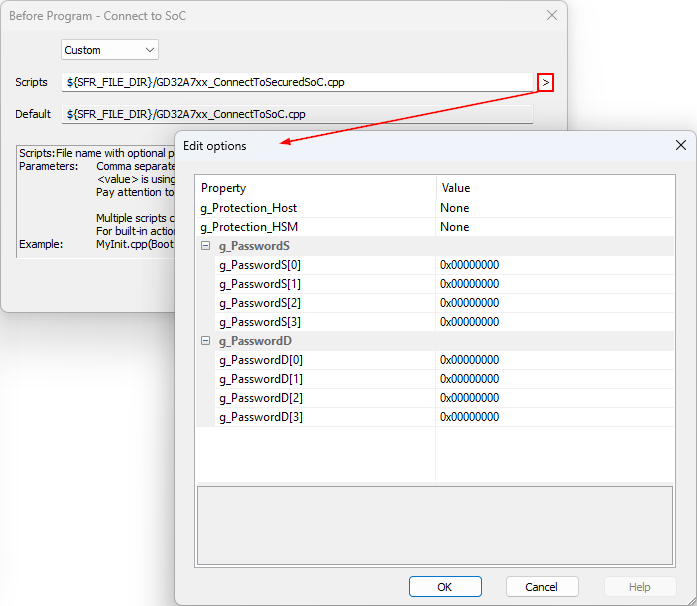
Password fields are:
- Static password: g_PasswordS
- Challenge–response g_PasswordD
Unlocking scenarios
- Both cores locked with challenge–response
- Provide only the HSM password in g_PasswordD
- Unlocking the HSM core automatically unlocks the other cores
- HSM locked with challenge–response, Cortex-M7 locked with static password:
- Provide Cortex-M7 static password in g_PasswordS
- Provide HSM challenge–response password in g_PasswordD
- Unlocking only the Cortex-M7 core
- Provide only the Cortex-M7 password (static or challenge–response, depending on configuration)
2. Enter passwords as described above.
3. After the script configuration is completed, you can program or attach to the locked SoC.