Eclipse IDE/Command line : Show help on tool errors
Possible solution
Eclipse IDE
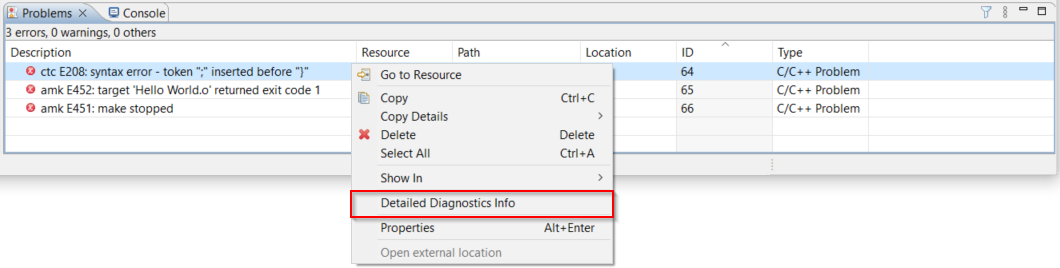
When you encounter errors or warnings in the TASKING Eclipse IDE during the build process, they are displayed in the Problems view.
To get more details or information about errors or warnings encountered :
1. Right-click on an error or warning in the Problems view.
2. Select Detailed Diagnostics Info.
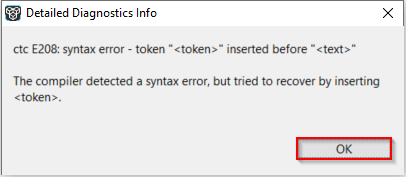
A pop-up message box appears with more details about the error or warning, as shown below.
Command Line
If you are using the tools on a command line, you can use the option --diag=<error number>.
For example:
ctc --diag=208
E208: syntax error - token "<token>" inserted before "<text>"
The compiler detected a syntax error, but tried to recover by inserting <token>.
For more information, see the --diag option in the Product user guide. For example, if you are using the TASKING TriCore VX-toolset, you can refer to the TriCore User Guide. The --diag option is also supported in other tools like C++ compiler, assembler, linker, archiver and HLL dumper.