Arm Cortex-M LPC4357: Debug M4 core via SWD Debug Protocol
09-Dec-2024
The LPC4357 is a dual-core with ARM Cortex-M4 and Cortex-M0 cores, which are accessed via the following Debug Protocols:
- Cortex-M4 on JTAG and SWD
- Cortex-M0 only on JTAG
By default winIDEA tries to connect to all available cores. When selecting the SWD Debug Protocol, winIDEA should connect only to Cortex-M4 core.
Possible solution
1. Open Hardware | CPU Options | SoC.
2. Make sure SWD Debug Protocol is selected.
3. Go to Cores | CortexM0 page.
4. Make sure the option Automatically observe this core is disabled.
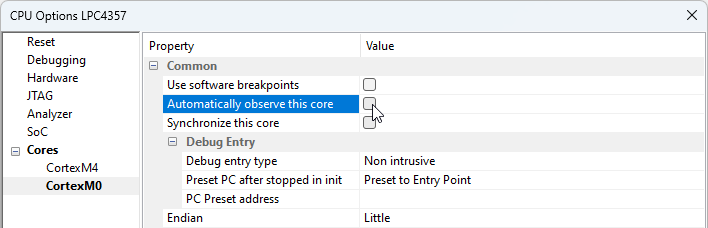
More resources in winIDEA Help
Was this answer helpful?
Similar topics
- Arm Cortex: JTAG scan when multiple devices are connected in a chain
- Arm Cortex-M: System reset fails
- BlueBox: I can no longer connect to the SoC
- winIDEA: Infineon TriCore – Failed to initialize debug session/DAP Initialization failed
- winIDEA: Infineon AURIX TC4x: Program devices in Foreground Boot mode